
For Australian schools · Staff PD and student programmes · Perth

Your teachers are already using AI. Let's make sure they use it well.

Hands-on AI training for Australian schools, on the tools you've already approved. Teachers leave with faster ways to plan, give feedback and write report comments. Everyone works to one rule for student data. Your leadership team gets a plan for 2027.

Start with a 90-minute staff session. Add PD days, online PD, student programmes and parent evenings when you're ready.

A teacher leaning over to help a student with a task on her laptop in a classroom
Your whole school
Staff PD, leadership planning, student programmes and parent evenings.
Your approved tools
Built on Copilot, Gemini or whatever your school has approved.
No student data
No names or identifying details go into any AI tool.
A quote in 48 hours
Priced to your school, on one page, after a 30-minute call.
Experienced educators
Delivered by our team of experienced educators. Staff work hands-on with their own planning, feedback and reports.
A reply within one business day
Every enquiry is read and answered by a person.
Ready for a whole staff
From one department to your whole staff, in your school or live on Zoom.
What we offer

Eight ways we support your school, from the staffroom to the parent evening.

Start with one 90-minute session, or combine formats into a whole-school programme. Every option is priced to your school, and you get a one-page quote within 48 hours of a 30-minute call.

For your students

And for your students, who are already using it.

Students learn to use AI as a tool and to question what it tells them. All three are delivered in your school and priced to your school.

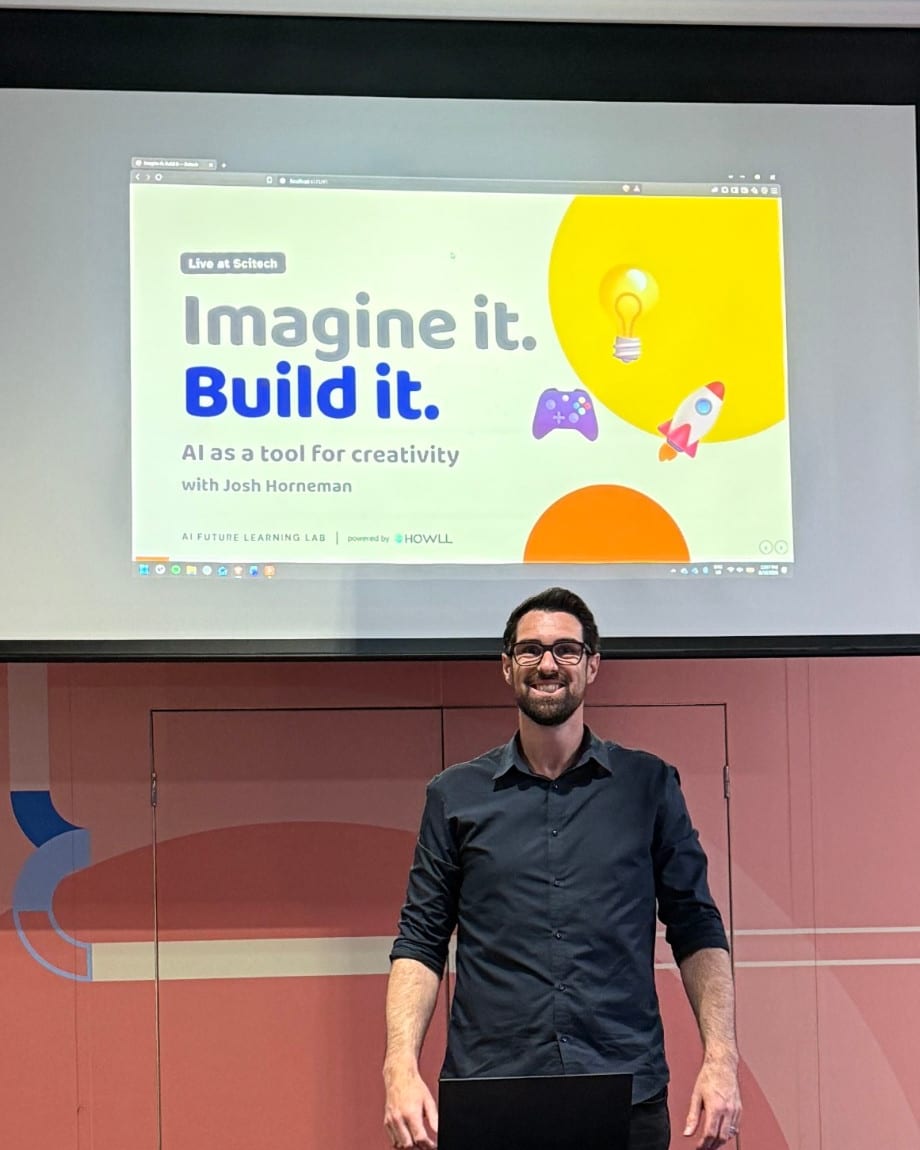
Our presenter in front of the opening slide of Imagine it. Build it., a session on AI as a tool for creativity
Recently delivered

Imagine it. Build it. Live at Scitech.

In October 2026 we ran a hands-on session on AI as a tool for creativity at Scitech in Perth. Kids and parents came up with an idea, then watched it get built with AI in front of them. It's the same approach we'll bring into your school.

About 50
in the room at its peak
Toddlers to teens
and their parents
October 2026
at Scitech, Perth
See the student formats →

AI and robotics incursions arrive in 2027. See the robotics program.

What schools are dealing with

The AI problems on your desk this term, and what we do about them.

3 in 4

teachers and school leaders already use AI for work, and most of them use it every week.

Learning First for NESA, May 2026

1 in 5

educators say their school has set rules on whether and how students can use AI in assessment.

Learning First for NESA, May 2026

26%

of Australian teachers name AI skills as their top professional learning need, ahead of every other area.

OECD TALIS, published Oct 2025

49%

of secondary teachers worry they don't know how to prevent AI-related plagiarism or cheating.

Learning First for NESA, May 2026

Report season and workload

Report comments, planning and feedback eat teachers' evenings.

What we do

Staff build a comment bank, a unit plan and feedback prompts in the session, with placeholders so no student names go in.

AI-written student work

Detection tools don't give you a reliable answer.

What we do

Staff set clear AI rules for each task and redesign key tasks so student thinking is visible.

Everyone doing it differently

A school can approve one AI tool, but staff and students will use several, in the open or not. Teachers set different rules, and students notice.

What we do

We teach skills and safe habits that hold across every tool, so every teacher starts from the same baseline and students hear the same rules in every class.

Turning the framework into practice

The national framework has six principles. Your school still has to make them work.

What we do

Start with our free scorecard. The whole-school programme adds a planning session with your leadership team.

Student data and blocked tools

Staff aren't sure what's approved or what can go into it.

What we do

We work in the tools you've approved and teach one rule: no names or identifying details, ever. If a site is blocked, we use an approved alternative.

Finding the time

You get a handful of staff development days, and everything wants one.

What we do

Half and full-day formats built for a staff development day, or a live online programme that fits around teaching.

Who we work with

One provider for your staff, your students and your parent community.

Start with your staff. Bring students in once your teachers are confident. Give parents straight answers along the way. Each card shows what's involved and what happens next.

For school leaders
Staff PD for primary and secondary · student programmes · parent information evenings

Hands-on PD built on the tools your school already has.

Every teacher leaves with the same baseline: faster ways to plan, give feedback and write reports, clear rules for student data, and assessment tasks that hold up. Start with 90 minutes. Move to a PD day or a live online programme when you're ready.

  • Staff PD: a 90-minute session, a half or full PD day, or 6 × 90 minutes live on Zoom
  • Student programmes for Years 7 to 12: a 2-hour session in your school, The Future of Work, and a 10-week programme for IT and Digital Technologies from 2027
  • Parent information evenings: we present, your school hosts, in school or online
  • One-page quote within 48 hours of a 30-minute call
Priced to your school
Book a 30-minute call
For teachers
Free · primary and secondary · any subject

Plan Term 4 in an afternoon with the free Term 4 Kit.

A term planning guide, a report comments method that keeps student names out of AI tools, and 25 copy-paste prompts. Want to go further on your own? Our courses for individual teachers start with a free intro.

  • Map the ten weeks, then draft units, tasks and rubrics
  • Report comments in your own voice, with no student names in the tool
  • Works in whichever tool your school has approved
  • A ready-made note to send your principal
For parents
Information · free

Your kid is already using AI. Do you know how?

Plain answers on what these tools are, how kids use them and house rules that hold. Want more? Ask your school to book a parent information evening. We present it, and your school hosts it for its families.

  • What AI tools are, in plain English
  • House rules and questions to ask at home
  • What to ask your school about AI
AI governance

One safe way to use any AI tool.

Governance sounds heavy. For a school it comes down to three things: a rule staff can remember, a check on where you stand, and a written plan.

Planning 2027

Put AI on your 2027 calendar before your board signs it off.

Term 4 is when schools set next year's calendar and staff development days. Two free ways to plan yours.

3 minutes · no email needed

The AI-Ready School Scorecard

Ten questions built on the national framework. See your score and your three biggest gaps, each with a next step.

Take the scorecard
30 minutes · free · no obligation

A planning call for your school

Talk through your 2027 calendar, your staff and where AI fits. We send a one-page quote within 48 hours, and you decide from there.

Book a 30-minute call
How it works

From first call to PD day in four steps.

We're new to schools, and we won't pretend otherwise. You get a one-page quote and the session outline in writing before you commit.

  1. Step 1

    A 30-minute call

    Tell us about your staff, your tools and your dates. If we're not the right fit, we'll tell you on the call.

  2. Step 2

    A quote within 48 hours

    One page with the format, the date and the price, plus the session outline for your staff.

  3. Step 3

    Setup

    We build the session around the tools you've approved and send IT a checklist of sites to allow before the day.

  4. Step 4

    The day

    In your school or live on Zoom. Staff work on their own planning, feedback and reports, and leave with what they built.

Our story

It started at a kitchen table, and it's still how we teach.

Josh Horneman founded Howll, which trains organisations on Microsoft Copilot, Google Gemini, ChatGPT and Claude. He's spent more than ten years coaching and consulting. The idea for the Lab came from home, on a weekend spent building a game with his kids.

One of his kids picked the ball and the enemies, and every change she called out showed up on screen a minute later. The kid who couldn't sit through homework kept pulling her chair back to the laptop. She was building it, and she knew it.

One game became eight. They're now Best Games Ever, a free games platform Josh and the kids built together.

In October 2026 Josh took the same idea to Scitech in Perth. About 50 kids and parents turned up for Imagine it. Build it., a hands-on session on AI as a tool for creativity.

Lidio founded Panorama Club, a working space in Leederville. When his daughter said she wanted to be a teacher, he asked what that job looks like once AI can tutor every student one-on-one. The question stuck.

Put together, that's how we teach: people learn fastest when they build something real with the tools, alongside someone who uses them every day. AI Future Learning Lab is an education initiative of HOWLL AI, run with Panorama Club.

Coming in 2027 · Robotics

Robots in the room.

AI and robotics incursions, with a Unitree robot dog, a Unitree humanoid and DJI drones your students operate themselves. First intakes in 2027. Register interest to hear first.

Unitree Go2Unitree G1DJI drones
Next step

Get your staff ready for 2027. Start with a 30-minute call.

Tell us about your staff, your tools and your dates. You'll have a one-page quote within 48 hours. If we're not the right fit, we'll tell you on the call.

A one-page quote and the session outline before you commit A person replies within one business day
Contact · hello@howll.ai
Perth, Australia